The agent already has the keys.
A coding agent holds what an attacker would need weeks to get: your files, your terminal, your SSH keys, your cloud credentials. It does not need to break in. It only needs to be pointed somewhere else.
That happens three ways. Something it reads tells it to: a web page, a dependency README, a poisoned skill or MCP server. Somebody tells it to, with access to your machine or your prompts. Or it decides on its own, halfway through a task, that a step you never agreed to is justified.
There is no patch coming for this. It is simply how these systems read. So don’t count on the agent to resist. Watch what it does next.
The attacker leaves with nothing.
Spotting an attack after your key is gone is just a report. Here is what happens instead, in order, within a few seconds.
It notices
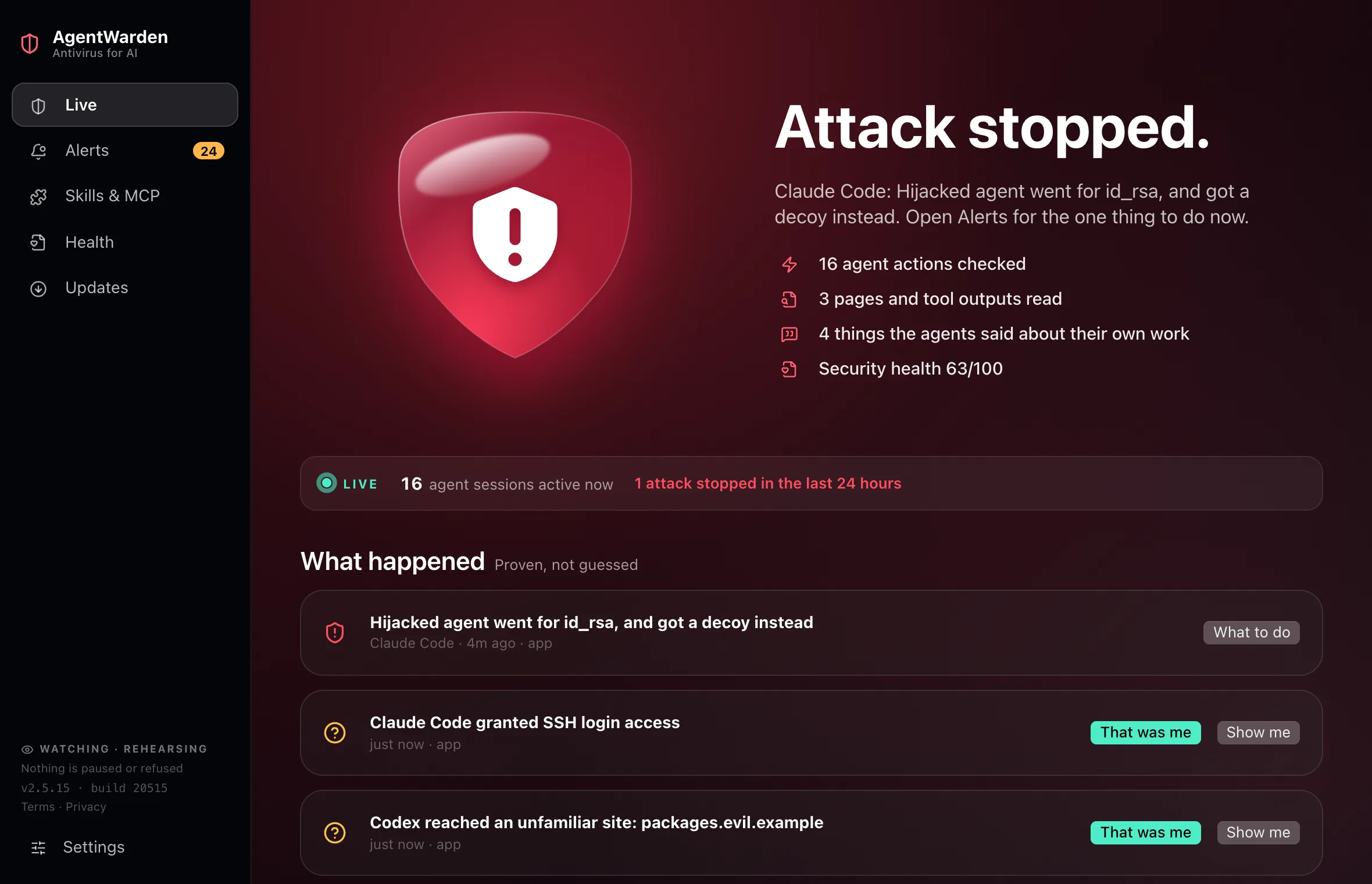
A session reads a web page, a README or a tool result, and somewhere in it is an instruction meant for the agent. AgentWarden marks that session the moment it happens.
It takes a restore point
Before the agent can act, a snapshot of your disk is taken. Whatever happens next can be undone.
It hands over a decoy
The agent reaches for your SSH key. It gets a fake one, planted for exactly this, and believes it succeeded. That command never reads your real key. Other dangerous actions are simply refused before they run.
It tells you what to do
Every alert answers four questions in plain English. What happened. What AgentWarden did. What is still unknown. What to do next, including how to replace any key it saw. You won’t be asked to approve a port number.
Containment spends its first week learning your work. It logs what it would have stopped and changes nothing until it has proven itself. The one exception is a proven attack, such as an agent running a command copied out of a page it just read: that one agent is paused for 5 minutes, even in the first week. It can never pause your terminal, your remote access, or a session it can’t identify with certainty. Refusing an action before it runs, and swapping in a decoy, works with Claude Code through its own hook system. For other agents, containment pauses the session instead. Containment is part of Pro.
Watch what your agents actually do.
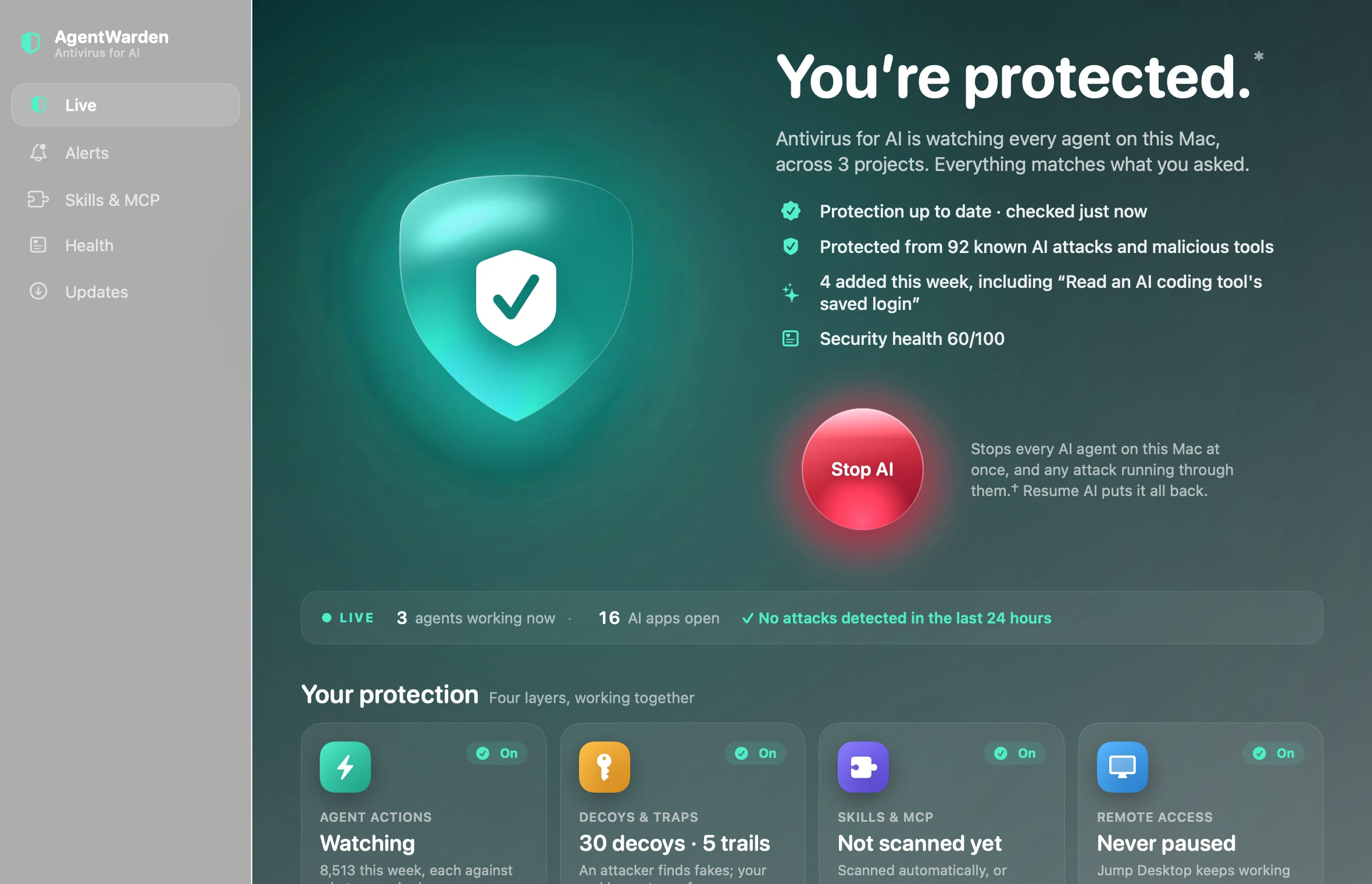
Open AgentWarden and the first thing you see is whether you are protected, and from what: how many known AI attacks and malicious tools it recognises, what the latest updates added this week, and your four layers of protection at a glance. Underneath, it reads each agent session as it happens, what you asked for, every command the agent ran and everything it read, and checks each step against the task you gave.
- Protected from every known AI attack in the signed rules, with what was added this week
- Four layers at a glance: agent actions, decoys and traps, skills and MCP, remote access
- Judged against your request, not a generic rule list, and explained in plain English
- Stop AI: one button stops every AI agent on your computer at once, and any attack running through them. Resume AI puts everything back. Free on every plan
- Check anything before you trust it: paste a message or a link, drag a file in, or right-click it in Finder or File Explorer. Hidden instructions for AI, scam signs and risky links, checked on your computer. Free on every plan
Every alert carries its own context.
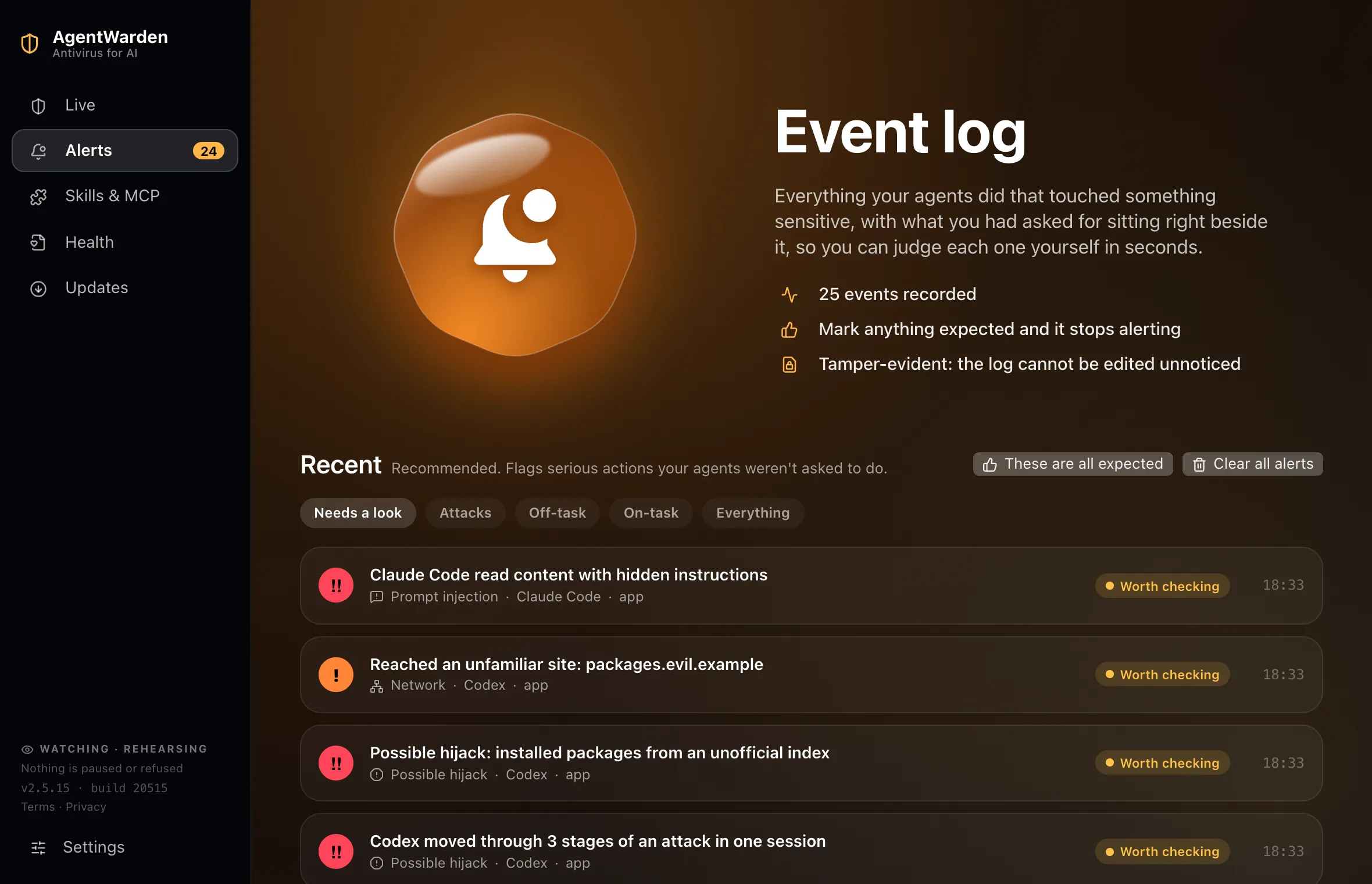
A security tool that cries wolf gets uninstalled. So every entry sits next to the request that was live in that session, and you can judge it in seconds. Mark something as expected and it won’t ask again.
- Your request shown next to the action
- Tamper-evident. Nobody can edit the log without it showing
Check everything an agent can load.
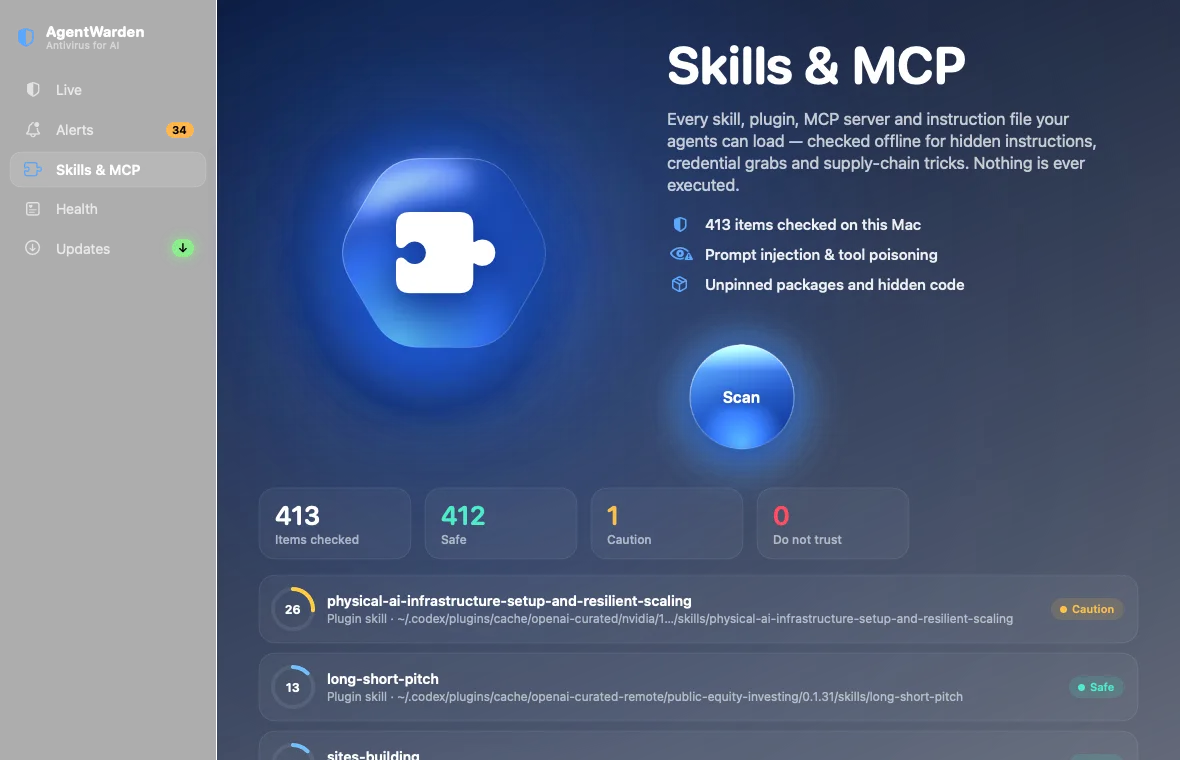
Every skill, plugin, MCP server and instruction file is a way into your machine. AgentWarden reads them offline and looks for hidden instructions, credential grabs and supply-chain tricks, and checks them against a signed list of ones already caught doing harm. It checks the AI models you download for Ollama, LM Studio and Hugging Face too, and you can check one by its link before you download it: a model file that would run hidden code when it is opened, or a chat template that slips instructions to the AI. It never runs any of them. If one is bad, one click takes it out, and Undo puts it back. If it is something you wrote yourself, say so: the score stays exactly as it is, and stops being counted against you until the file changes.
- Prompt injection and tool poisoning
- Known-malicious skills and MCP servers, updated daily
- AI models: hidden code and hidden instructions, even before you download one
- Unpinned packages and obfuscated code
- Remove a skill or disable a server, with Undo
- Trust a file you wrote yourself, until it changes
Know how exposed you are before it matters.
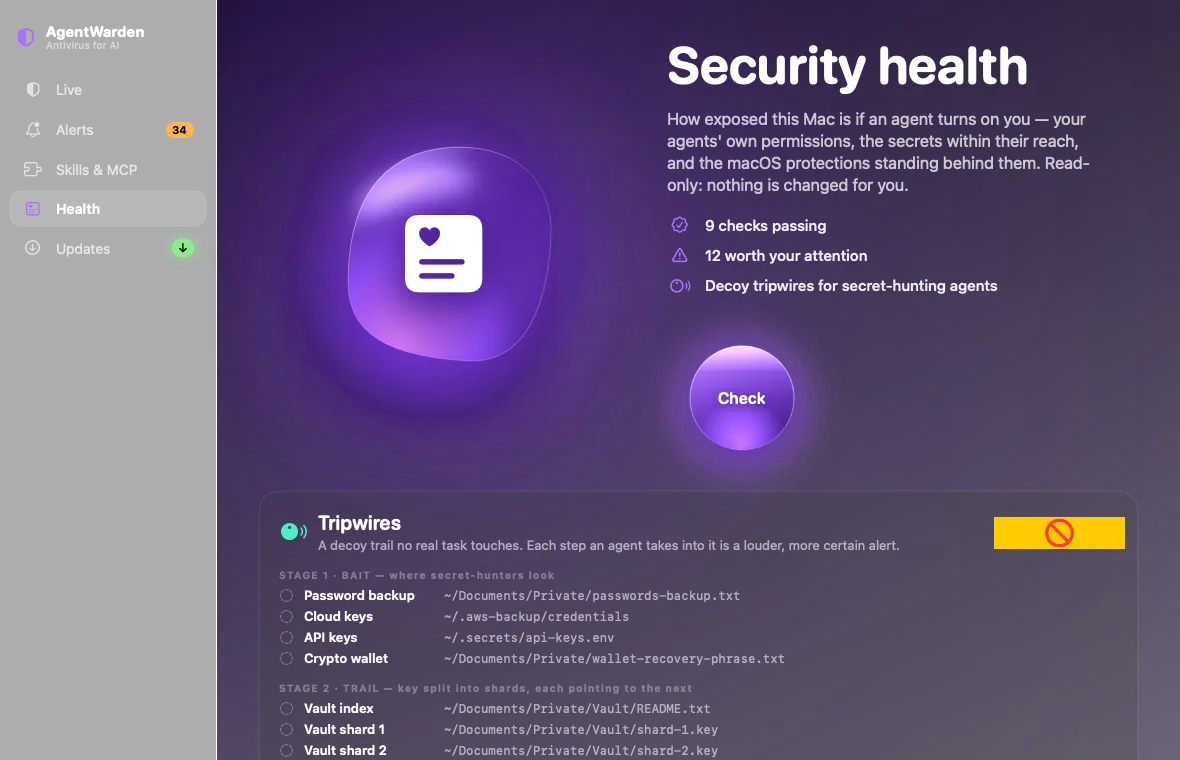
How much damage could an agent do on this computer right now? AgentWarden looks at your agents’ permissions, the secrets they can reach and the system protections behind them. Nothing changes unless you press Fix, and every fix can be undone. System settings it only opens for you, never changes.
- Agent sandbox and approval settings
- Plain-text keys, and SSH keys with no passphrase, that an agent could reach
- Fix makes keys and credential files private, with Undo
New attacks reach you the same day.
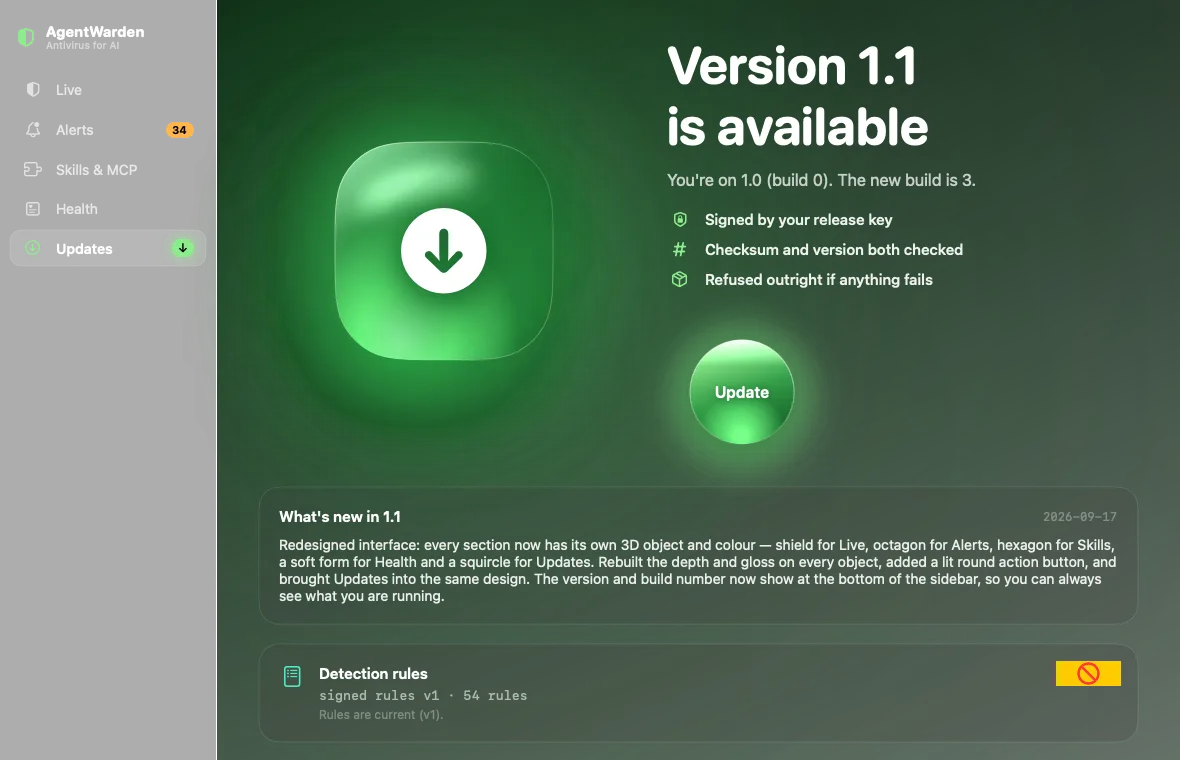
Detection rules, the list of known-malicious skills and new decoys ship as signed data, separate from the app, so a new technique gets covered without waiting for a release. The app updates itself too, only when your agents are idle, and restarts in the background, putting your window back exactly where you had it and never in front of what you are doing. Each update has to pass four checks before a single byte is installed.
- New detections, known threats and decoys, shown in the app as “added this week”
- Signed with a key that never leaves our own machine
- Installs itself when your agents are idle. You can switch that off
Is this for you?
AgentWarden protects the AI on your computer, and you from it, including when someone outside tries to steer it.
You run AI on your computer.
- Claude Code, Codex, Cursor or another coding agent
- Claude Desktop, the ChatGPT app or Copilot with access to your files, mail or accounts
- Any AI app that can read your documents or open links for you
You use AI, but not in a terminal.
- Documents, emails and pages are checked for instructions hidden for AI
- Decoy files catch an AI that goes hunting through your documents
- Stop AI pauses every AI on the computer at once, and puts it back
- Anything you are unsure of can be checked before you trust it: a message, a link, an invoice
You only use AI in a browser tab on someone else's computer.
- There is nothing running here for AgentWarden to watch
- It is not a replacement for Microsoft Defender or macOS protection
- It cannot see what a cloud assistant is sent once it leaves your machine
Free forever. Pro when you need it.
Monitoring never stops, on any plan. Paying covers the parts that take real work to run, and keeps AgentWarden being built.
Free
No account, no card.
See what every agent does.
- Live monitoring of every agent
- Every alert explained
- Emergency stop for every AI agent
- Learns your routine, never an attack4
- Security health
- Signed rule updates
- 1 computer
Pro
Billed monthly · Early-bird price†
Stops an attack, not just reports it.
- Everything in Free
- Pause or refuse a hijacked agent**
- Skill, plugin & MCP scanning
- Decoy tripwires
- Phone & email alerts
- Incident timeline & shareable reports
- 3 computers, Mac or Windows
No card needed ·
Teams
€79 each with 20 or more.
Pro for everyone, on one invoice.
- Everything in Pro, for each person
- 3 computers each
- A team page to manage seats
- One invoice with your VAT number
Compare plans in detail 100 people or more? Talk to us
Prices in euro, tax included. Elsewhere you pay in your own currency, shown before you pay · Cancel any time · 14-day money-back · Invite a colleague: they get 20% off, you get a free month
Thirteen ways an agent turns on you.
Hijacked by what it read
Hidden instructions in a page or file, then a sensitive action you never asked for.
Agents coordinating on their own
Sessions passing messages through a file, or acting alike after reading the same poisoned page. Told apart from your own parallel work, which stays quiet.
Runaway and flooding agents
Hundreds of processes, or a burst of sensitive actions. Reported calmly.
Credential hunting
SSH keys, keychains, cloud tokens and browser passwords the task never needed.
Persistence
Login items, launch agents, cron and shell profiles that survive a reboot.
Supply chain in skills, MCP and models
Every skill, plugin, MCP server and downloaded AI model read offline before it can do harm.
Tampering with the watchdog
Attempts to switch off security tools, AgentWarden included.
What the agent says about its own work
An agent saying it will go off-task, hide something or fake a result.
Its own session log being altered
A session log that shrinks or gets rewritten. Someone is editing history.
Small steps that add up
Poisoned page, then a key, then a socket: named as one intrusion.
Agents talking to each other behind your back
Two sessions passing messages through a file outside the work.
More bait once something is already suspect
More decoys around a suspect session, so intent proves itself.
Gaps in its own cover
If it was not running while your agents were, it says so.
Bait that no real task ever touches.
Detection rules describe attacks somebody already thought of. Tripwires catch the ones nobody has. AgentWarden plants decoy secrets where a secret-hunting agent looks first: a password backup, cloud keys, an API key file, a wallet phrase.
They form a trail. The bait points at a vault. The vault’s key is split into shards. The last file hands over what looks like a full set of production keys, plus an address to upload them to. Every step deeper raises a louder, more certain alert.
All of it is fake, and the upload address sits on a reserved domain that can never resolve. An agent that takes the bait gets nothing. You get a near-certain sign that something is wrong.
When a hijacked agent asks for one of your real keys by name, AgentWarden can hand it the decoy instead. It believes it got what it came for and stops there. Your real file is never opened. New decoys and trails arrive with updates, chosen from what attackers are going after that week.
- Stage 1 · Bait~/Documents/Private/passwords-backup.txtReading it is suspicious.
- Stage 2 · Trail~/Documents/Private/Vault/shard-1.keyFollowing it is deliberate.
- Stage 3 · “Success”~/Documents/Private/Vault/production-keys.jsonTaking it is intent.
- Stage 4 · Usevault-sync.awtrap.invalidNear-certain exfiltration. And nothing actually leaves.
Quiet, by design.
Your own work interrupted
Containment only acts on a session judged to be hijacked. It can never touch your terminal or remote access like Jump Desktop, RustDesk, Parsec or Chrome Remote Desktop, and it spends a week learning your work before it acts, unless an attack is proven.
CPU while watching
We measured it: 0.53s of CPU over 45 seconds. People uninstall security tools that heat their machine.
Alerts you did not ask for
Actions that match what you asked for stay quiet. You can mark anything expected and it never asks again.
Your code leaving your computer
Transcripts and findings stay on your machine. Alerts go only where you send them: your paired phone, sealed so only the phone can read them, or your email if you turn that on, with one line about what happened. Activating a licence sends your email and a one-way fingerprint of the computer. Nothing else.
Before you install it.
Will it slow my computer down?
No. It uses around 1% of the processor and sits still. No constant animation, nothing that heats your machine.
What does Stop AI do?
It is the emergency stop. One press on the Live page pauses every AI agent on your computer and everything they started, makes Claude Code refuse every new action (while containment is on, as it is by default), and switches off MCP servers in your agents’ settings, with a copy of each file kept first. Your terminal, your remote access and your keys are never touched. That stops an attack using them while it is under way. It cannot undo what already ran, and it cannot stop something that is not running through an AI agent. Resume AI lets each agent carry on where it stopped and puts back exactly what was switched off. Anything you changed in the meantime is left as you left it, and shown to you. It is free on every plan.
Will it interrupt my work?
No. Only a session judged to be hijacked is ever stopped, and containment spends its first week learning your work without changing anything. The one exception is a proven attack, such as an agent running a command copied out of a page it just read: that one agent is paused for 5 minutes, even in the first week, and you can resume it at any time. It never touches your terminal, your shell or remote access like Jump Desktop, RustDesk or Parsec.
Does anything leave my computer?
Your code and transcripts never do. Alerts go only where you send them: your paired phone, sealed so nothing in between can read them, or your email if you turn that on. An email alert carries one line about what happened, never your code, commands or file names. Activating a licence sends your email and a one-way fingerprint of the computer.
Does it update itself?
Yes, by default. Detection rules and the known-threat list update on their own. The app installs its own updates only when no agent has been busy for 10 minutes, and restarts in the background. Your window comes back exactly where you had it: minimised if it was minimised, behind your work if it was open there, and in front only if you were looking at AgentWarden itself. It never appears over what you are typing. Switch it off in Updates and you get one notification per new version instead.
Something isn’t working. How do I tell you?
In the app: Report a problem, in Settings or the Help menu. It shows exactly what will be sent before you send it, and never includes your files or code. Each alert also has “This alert was wrong”. Or use the Support page, or email [email protected]. A person reads every report.
Mac and Windows?
Both, with the same engine, the same rules and the same tests: every release passes the same checks on both, over 2,800 of them, or it does not ship. macOS 14 or later on Apple silicon (notarised by Apple) and Windows 10 or 11 (from the Microsoft Store). Linux and the iPhone companion are on the way.
Does it keep running?
Yes, quietly. It starts when you sign in and stays in the menu bar or system tray. If it ever stops unexpectedly, it comes back by itself in the background, without a window over what you are doing. Quit it on purpose and it stays quit until you open it again. You can turn off starting at sign-in in System Settings or Windows Settings, and the app tells you if something has switched it off.
What does the Pro checkup show?
Five answers, on the Health page. Which skills and MCP servers are new or changed since you last looked. When CLAUDE.md, AGENTS.md or project settings changed. What each agent is allowed to do without asking you, read from its own settings. Which keys and credential files an agent could reach, whether a decoy stands in front of each, and whether an agent has reached for one. And whether your safety nets are in place, should an agent delete or break something: backups, restore points, and projects with a copy elsewhere. It only checks file names and settings, never the contents of your keys, and nothing leaves your computer.
Does it add a desktop icon?
Only if you want one. On Windows it asks once, and your answer sticks. It is always in the Start menu.
How do I know it is working?
The main page tells you: whether you are protected, how each of your AI tools is covered and when it was last active, how many known AI attacks and malicious tools it recognises, what updates added this week, your four layers of protection, and this week in numbers, including any time an attacker was handed a decoy instead of your real files. Zero attacks is a fine answer; it means nothing got through.
Which agents does it cover?
About 30: Claude Code, Codex, Cursor, Gemini CLI, Copilot, Windsurf, Kiro and more. Claude Code and Codex are checked step by step against what you asked; the rest are recognised running, with their commands, skills and settings checked. The list updates itself.
What can’t it do?
No security tool catches everything. If an action is already running, or the agent has no hook support, AgentWarden detects it but can’t stop it. Rules can be evaded, which is why there are decoys and daily rule updates. And it’s protection for a person’s own computer, not enterprise endpoint security. The full list is on the Limits page.
Is there a discount if I recommend it?
Yes. Send a colleague your link from the app. They get 20% off their first payment, and when they subscribe you get a free month of Pro, up to three times.